

Skip to content
Amit Kumar, Senior Design Manager, UX & Product Design

// Home/// Work/// AI Recruitment Command Center

AI Recruitment Command Center

UX and design system for Skywalk Consultant's AI recruitment platform. n8n workflows screen and route candidates, and a command center lets recruiters see, check and override every AI decision.

// System case study

From a client's brief to an approved shortlist, with a person at every gate.

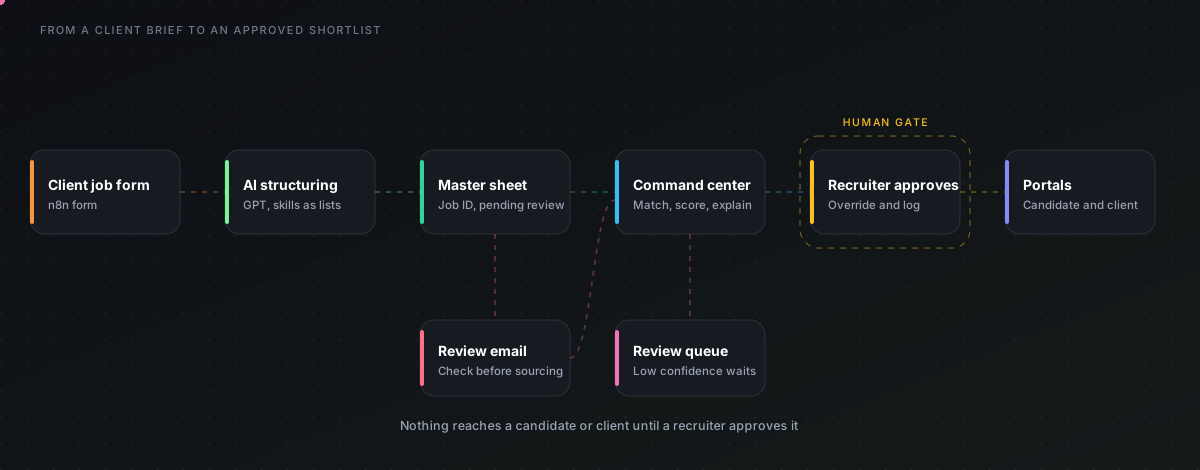
A recruitment platform for Skywalk Consultant. n8n takes the repeat steps, the command center shows recruiters what the AI did and why, and nothing reaches a candidate or client until someone approves it. I designed the experience, the design system and the intake workflow.

3
Modules in the system
9
Product screens below
1
n8n workflow running with the client
In build
Status (2026)
n8n · system map
System map: a client job form flows through AI structuring to a master sheet, then the command center, a recruiter approval gate and the portals
System map. The dashed box is the human gate. Swipe sideways to see all of it.

// Inside the system

3 modules, each with its own flow and screens

PrototypeRunning with a client

Job intake automation

Turns a client's free-text brief into a structured record that waits for review.

Client job forms become structured records with skills lists, missing fields, and a pending-review gate before any sourcing starts.

  • n8n forms
  • OpenAI
  • Google Sheets
  • Gmail
Full build notes
Client job intake workflow
The actual n8n workflow: Client job intake workflow

Screens use sample data unless a caption says otherwise.

Client
Skywalk Consultant
Industry
Recruitment / HRTech
Timeline
2026, in build
Technologies
n8n, Figma, Design systems, AI agents

Project Overview

Recruiters at Skywalk Consultant spent most of their day on repeat work: reading CVs, matching them to roles, sending follow-ups and updating trackers.

A recruiter command center sitting on top of n8n automation. The workflows handle the repeat steps. The command center shows recruiters what the AI did, why, and what is waiting for them.

My role

  • UX lead and design system owner
  • Mapped recruitment process into n8n workflows
  • Designed trust, override and review-queue patterns for AI decisions

Key Features

  • AI score explanations and one-step override with logging
  • Failed or low-confidence runs go to a review queue
  • Design system from Skywalk brand: brand orange, navy ink, Poppins, Open Sans and Raleway

Challenges & Solutions

Challenge: Repeat recruiter work and opaque AI decisions
Solution: I mapped the recruitment process into n8n workflows: job intake, AI structuring of the brief, resume screening against the job, shortlist scoring, follow-ups and tracker updates. Each workflow has a clear point where a person approves before anything goes out to a candidate or client.

Takeaways

In build. The job intake workflow and the design system are done, and the review and pipeline screens are being connected. No time saving figures are claimed until they are measured.

At a glance

My role

UX lead and design system owner

Timeline

2026, in build

Recruitment / HRTech

Key decision

Every recommendation shows matched requirements, supporting evidence and gaps. Accept, reject and edit sit next to it. Every override is logged.

Evidence on this page

2 built, 1 provisional, 1 illustrative, 0 planned

Each outcome below is labeled.

// The problem

What was getting in people's way

Labels used on this page: Built means working today. Provisional means designed but not yet fully live. Illustrative means a scenario. Planned means on the roadmap. Personas are derived from workflow analysis and are not interview findings.

A recruitment consultancy runs on information that arrives in every shape: CVs in email, resumes forwarded on chat apps, job briefs on calls, status in spreadsheets. One hiring workflow can touch five tools before a candidate reaches a client. The product question was never 'how do we add AI'. It was 'how do we give recruiters one place to see everything, let automation do the repeatable work, and keep a person responsible for every decision about a human being'.

Candidate data is scattered

The same person can sit in several inboxes and sheets. That means duplicate records, inconsistent history and time lost searching.

Matching is manual and uneven

Reading a CV against a brief by hand takes minutes per candidate, and two recruiters rarely apply the same criteria.

Employers cannot see progress

Clients ask for updates by call and message, which adds coordination work for the recruiter.

Pipeline state is unclear

Nobody can answer quickly which candidates await screening, which interviews are booked and which offers are open.

Revenue is hard to trace

Without placements tied to jobs, clients and recruiters, forecasting stays a guess.

// Strategy

From business problem to measurable outcome

KPIs are what the product is built to move. They are targets until a measured result is shown.

A recruitment operating system where candidates, recruiters, employers and business reporting share one source of truth. Automation prepares the work, and the recruiter approves it.

Business problemProduct capabilityKPIIntended outcome
Slow screeningAI-assisted matching with explanationsTime to shortlistFaster, more consistent shortlists
Duplicate candidate recordsDuplicate detection on identifiersDuplicate rateCleaner candidate data
Pipeline uncertaintyStage based pipeline boardStage ageingBottlenecks visible early
Manual client updatesEmployer view of shortlist and statusUpdate turnaroundFewer status calls
Revenue uncertaintyPlacement and fee trackingRevenue per placementForecasts based on real pipeline
Resumes spread across inboxes and chatstoOne candidate record with source and history
Manual CV against brief readingtoRanked matches with reasons and gaps
Spreadsheet pipeline trackingtoStage based pipeline with ageing
Repeated client status callstoShared status view for the employer
Manual reporting at month endtoPlacement and revenue views from live data

// Users

Who the product is for

Provisional personas, derived from the workflow and the roles involved. They are not interview findings.

Recruitment consultant

Submit qualified candidates quickly

  • Fast candidate search
  • A clear job brief
  • Match help with reasons shown
  • Follow-up reminders
  • Less repeat data entry

Recruitment manager

Keep the team productive and the pipeline moving

  • Funnel and stage ageing
  • Workload balance
  • Placement reporting
  • Bottleneck alerts

Employer or hiring manager

See suitable people and decide without chasing

  • Structured candidate profiles
  • Shortlist visibility
  • Interview coordination
  • Plain progress updates

Candidate

Be considered fairly and know where things stand

  • Simple profile submission
  • Resume management
  • Clear communication
  • Status visibility

Agency owner

Grow revenue and control cost

  • Revenue by client and recruiter
  • Placement performance
  • Forecasting
  • Productivity view

// Capabilities

What the app can do

Status labels show what is working today and what is still being connected.

Built

Structured job intake

A form captures client requirements in a fixed structure so every job starts complete.

Built

AI job structuring

Free text becomes a clean record: experience range, mandatory and preferred skills, and what is missing.

Built

Master job record

Each job gets an ID and lands in a master sheet. Re-runs update the row, not duplicate it.

Built

Recruiter review gate

Every new job is Pending Review and the recruiter is emailed before any sourcing begins.

Planned

Resume parsing

Text is pulled from PDF and DOCX and mapped to a candidate structure.

Planned

Duplicate detection

Likely duplicates are flagged on email and phone, never on name alone.

Provisional

Explained matching

Ranked candidates with matched requirements, evidence and gaps.

Provisional

Review queue and override

Low confidence and failed runs wait for a person. Every override is logged.

Planned

Pipeline and analytics

Stage board, funnel, time to fill and revenue per client.

// Scenarios

A new client brief arrives

The client fills the form. Within a minute the recruiter has a structured record with a list of what the client forgot to say, and a review email.

Choosing the shortlist

The recruiter opens ranked candidates, reads why each matched, rejects one with a reason and shortlists four.

A manager checks the week

The manager looks at stage ageing, sees three candidates stuck at screening and reassigns them.

// Process

Recruitment lifecycle, from job brief to placement

Stage 01 of 8

Client intake

A client submits a requirement through a form. Fields are structured so experience, skills, location and employment type are captured the same way every time.

// Design decisions

Problem, evidence, decision, trade-off, validation

Each decision is written the same way so the reasoning can be checked.

Decision 01

The AI proposes, the recruiter decides

Problem
Recruiters will not trust a score they cannot question, and a person's livelihood should not hinge on a number.
Evidence
Design rationale from the recruitment workflow and from how language models fail (confident, wrong, unexplained).
Decision
Every recommendation shows matched requirements, supporting evidence and gaps. Accept, reject and edit sit next to it. Every override is logged.
Trade-off
One extra click per candidate compared with auto-shortlisting. Slower in the best case, safer in the worst.
Validation
Track recruiter agreement and override rate once live. A high override rate means the matching needs work.

Decision 02

Pending Review as a status

Problem
An AI extracted record that silently flows into sourcing can carry an error through the whole job.
Evidence
Intake prompt is deliberately strict, yet extraction can still misread a free text brief.
Decision
Every new job lands as Pending Review. A recruiter email asks for a check before sourcing begins.
Trade-off
A short delay at the start in return for a trusted record later.
Validation
Count how often recruiters edit a record at review. That is the extraction error rate.

Decision 03

Missing information as a first class output

Problem
Clients leave out notice period, salary or must-have skills, and the gap surfaces late.
Evidence
Common pattern in free text job briefs. The model is instructed to list gaps instead of guessing.
Decision
The record carries a list of missing fields, so the recruiter knows exactly what to ask the client.
Trade-off
More fields on screen. Mitigated by showing the list only when it is not empty.
Validation
Measure the number of clarification rounds per job.

Decision 04

Skills are normalised before they are compared

Problem
JS, JavaScript and Java Script would be three different skills to a naive filter.
Evidence
Typical resume vocabulary variance.
Decision
A shared skill vocabulary maps variants to one term before matching.
Trade-off
The vocabulary needs maintenance as roles evolve.
Validation
Review unmatched terms weekly and add the common ones.

Decision 05

Match without sensitive attributes

Problem
A ranking model can pick up on gender, age, religion or similar signals hidden in a resume.
Evidence
Well known risk in automated screening.
Decision
Matching dimensions are limited to skills, experience, domain, qualifications, location and availability. Sensitive attributes are excluded from scoring.
Trade-off
Less predictive signal in exchange for fairness and legal safety.
Validation
Periodic bias review comparing shortlist rates across groups on anonymised data.

// Architecture

How recruitment data moves through the system

Layers show the designed architecture. The intake workflow is built. Other parts are being connected.

L1Intake

n8n form triggerEmail and chat channels

Structured entry for jobs, multi channel entry for resumes.

L2Automation

n8n workflowsWebhooksSchedules

Repeatable steps run without a person. Each has a human gate before external action.

L3AI

Language model extractionMatch explanation

Strict prompts, JSON output, parse and validate before saving.

L4Records

Google Sheets jobs masterCandidate and pipeline records

Job ID based upsert so a re-run updates instead of duplicating.

L5Command center

Review queuePipeline boardAnalytics

Where recruiters see what the AI did and act on it.

  1. 01

    Ingest

    Receive data from a form, mailbox or upload.

  2. 02

    Validate

    Check file type, size and required fields. Failures return a clear message.

  3. 03

    Parse

    Extract text and structure from PDF or DOCX.

  4. 04

    Normalise

    Map skills, titles and units to one vocabulary.

  5. 05

    De-duplicate

    Flag candidates who share contact identifiers.

  6. 06

    Store

    Write structured records keyed by ID.

  7. 07

    Match

    Compare to the brief and prepare an explanation.

  8. 08

    Review

    A recruiter accepts, rejects or edits.

  9. 09

    Measure

    Events become funnel and revenue data.

// Privacy and control

  • Role based access so a recruiter sees their own jobs and a manager sees the team
  • Candidate consent captured at submission
  • Retention and deletion rules defined per record type
  • Secure document access and an audit trail for overrides
  • Sensitive attributes kept out of scoring
  • Designed with India's data protection requirements in mind. This page makes no compliance claim.

// Proof

Product screens

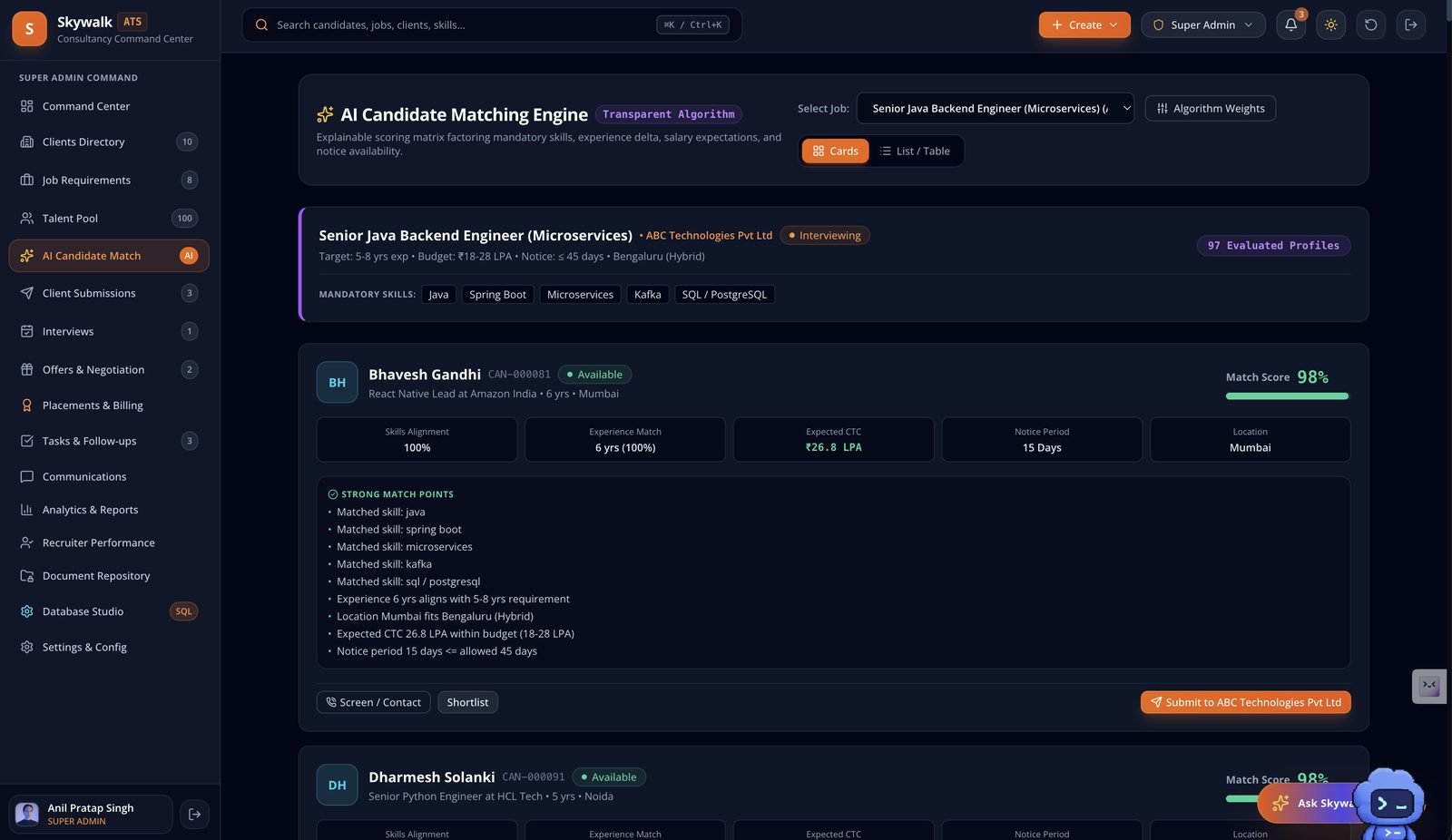
AI Candidate Matching Engine showing a match score with skills, experience, CTC and notice period checks and a list of strong match points
AI candidate matching. Each score shows its parts and the reasons behind it, so a recruiter can check it before submitting. Sample data.
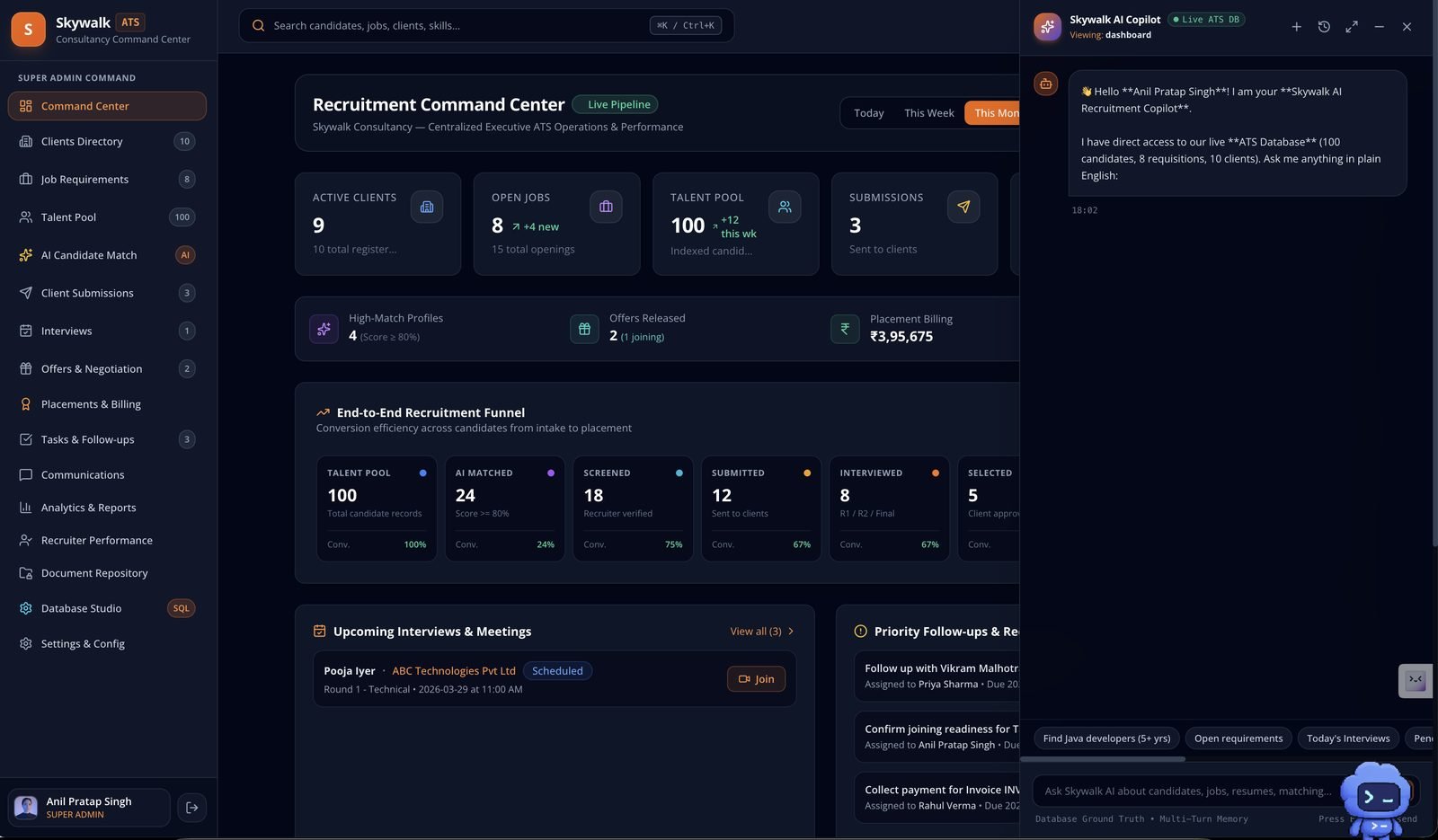
Recruitment Command Center with pipeline counts, a funnel and the Skywalk AI Copilot chat open
Command Center with the AI Copilot beside it. The copilot answers from the live ATS database. Sample data.
n8n workflow that turns a new client job requirement into a structured job record
The intake workflow in n8n: a client job requirement is read by an AI model, parsed, saved to a sheet and sent on.
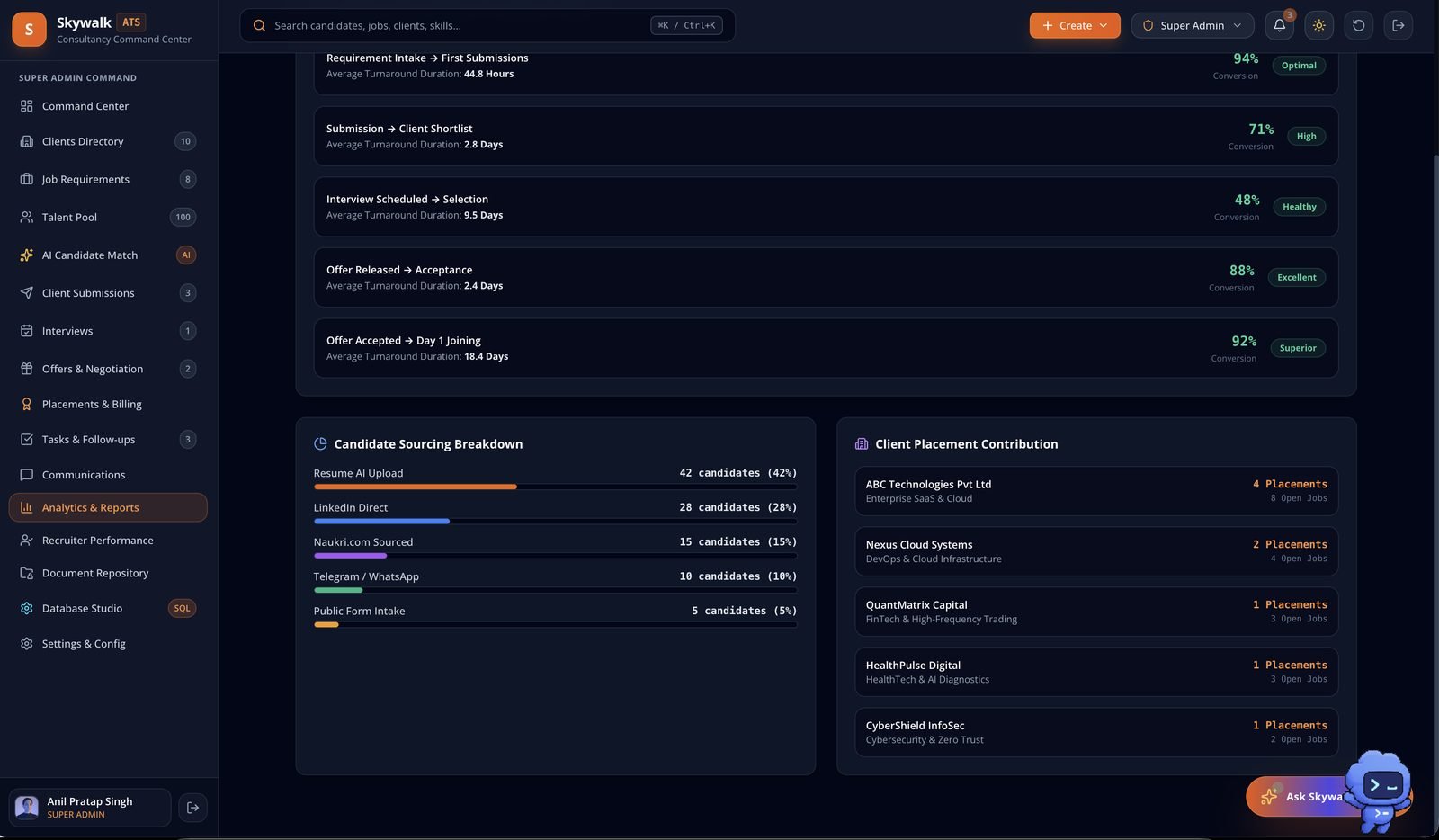
Analytics and reports showing stage turnaround times, conversion by stage and candidate sourcing breakdown
Analytics: time and conversion between stages, and where candidates come from. Sample data.
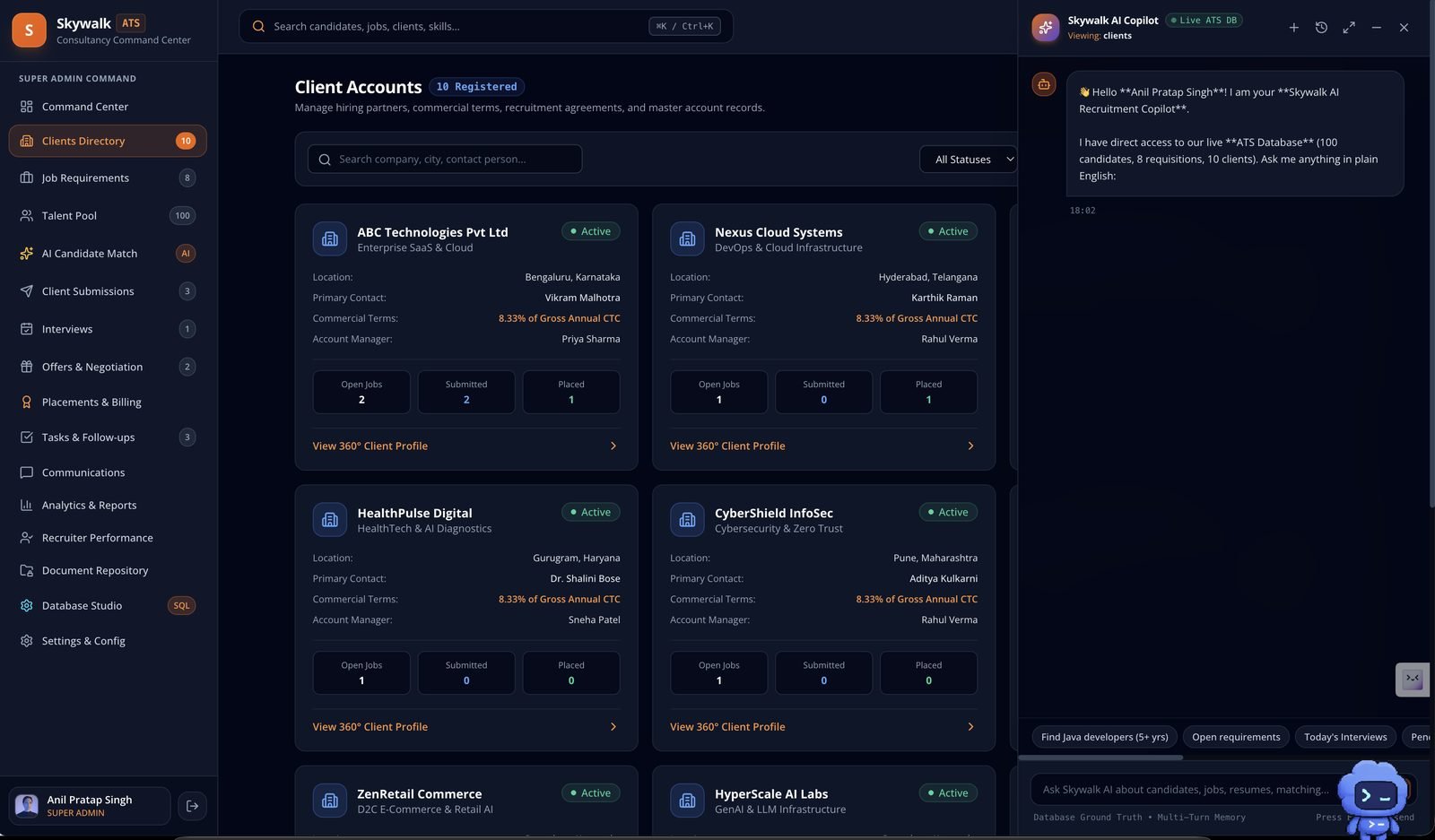
Client accounts directory with open jobs, submissions and placements per client
Client accounts, with commercial terms and a count of open jobs, submissions and placements. Sample data.
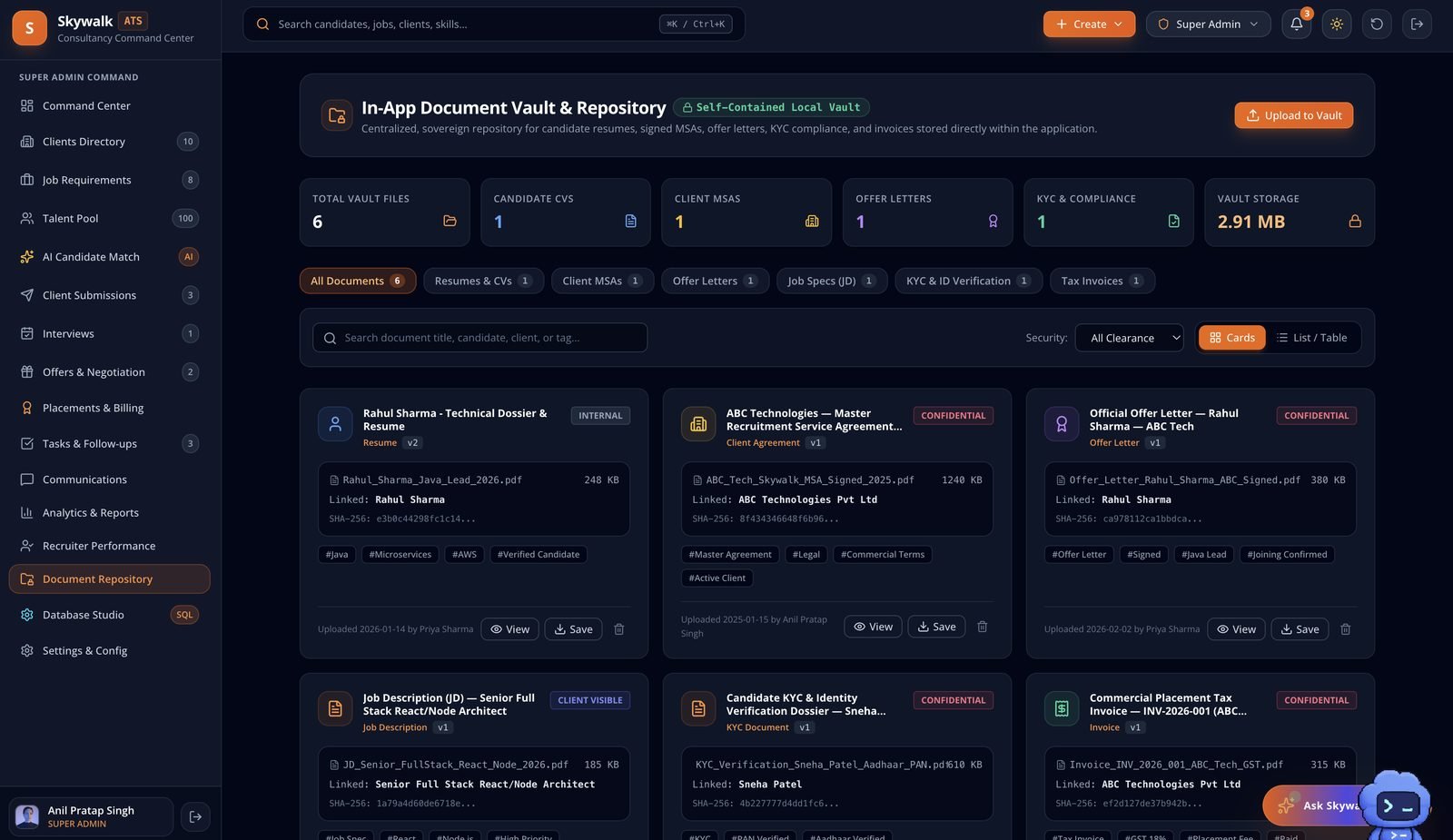
Document vault listing resumes, agreements, offer letters and other files with clearance labels
Document vault with clearance labels for internal, confidential and client-visible files. Sample data.
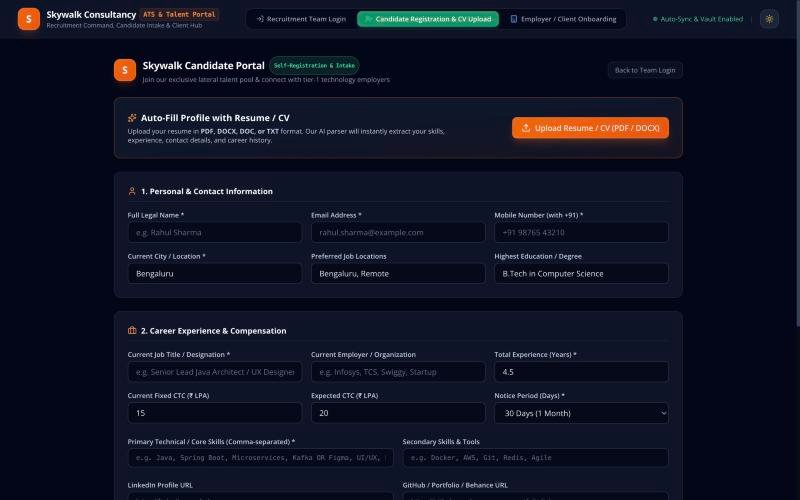
Skywalk candidate portal with resume upload and profile form
Candidate portal: resume upload auto-fills the profile. Live screen, captured 8 Oct 2026.
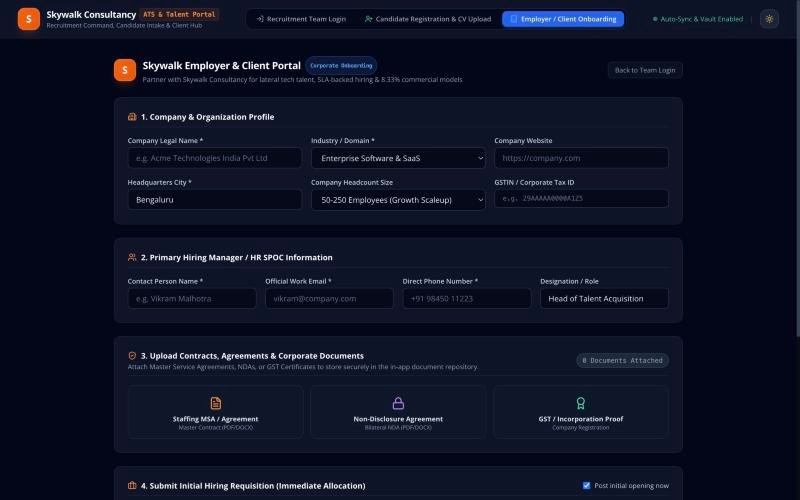
Skywalk employer and client onboarding portal
Client portal: company profile, documents and first hiring requisition. Live screen, captured 8 Oct 2026.
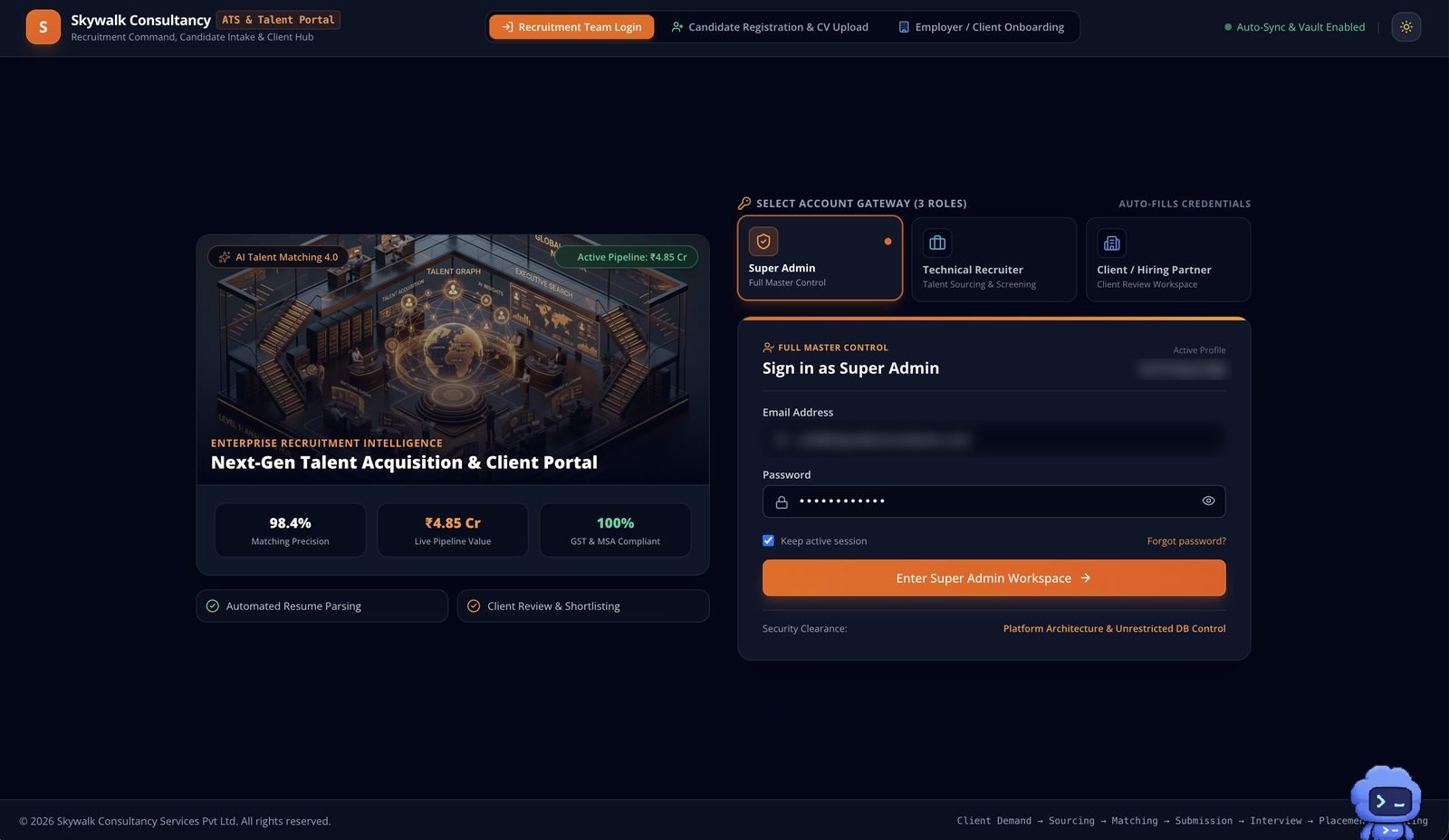
Skywalk sign-in screen with three role choices: super admin, technical recruiter and client
Sign-in with three roles. Account details are blurred.

// Intelligence layer

From resume data to recruitment intelligence

Example job, weights and candidate are illustrative. They show how a match is explained, not a measured result.

Example job

Senior Product Designer

  • 8+ years of experience
  • Enterprise SaaS
  • UX research
  • Design systems
  • Figma
  • Product strategy

Illustrative weights

Required skills35%
Relevant experience25%
Domain experience20%
Qualifications10%
Location and availability10%

Match explanation

Candidate A, illustrative 88 of 100

Matched

  • Enterprise SaaS experience
  • Design systems
  • UX research
  • Product strategy

Possible gaps

  • Limited evidence in the employer's specific industry

Recruiter actions

ShortlistReject with reasonAsk a questionEdit match

// How matching should be evaluated

  • Precision at K and recall at K against recruiter shortlists
  • Recruiter agreement and shortlist acceptance rate
  • False positive and false negative rate
  • Explanation usefulness, rated by recruiters
  • Processing latency

// Cautions

  • A match score is a prompt for review. It is not a measure of a person's quality.
  • Weights shown here are illustrative and not a published implementation detail.
  • No protected or sensitive attributes are used to rank candidates.

// Analytics

Turning recruitment events into decisions

Funnel numbers are illustrative sample data. The KPIs are defined and planned, not live dashboard features.

Applications received400
Screened240 · 60% of previous
Shortlisted80 · 33% of previous
Interviewed40 · 50% of previous
Offers accepted12 · 30% of previous
Placed10 · 83% of previous
KPICalculationStatus
Time to shortlistShortlist date minus job opening datePlanned
Time to fillPlacement date minus job opening datePlanned
Submission to interviewInterviews divided by submissionsPlanned
Offer acceptanceAccepted offers divided by offersPlanned
Revenue per recruiterPlacement revenue divided by recruitersPlanned
Revenue per clientRevenue grouped by employerPlanned

// Business impact

Try the scenario calculator

Change the assumptions and see the effect. Defaults follow a ten recruiter agency.

Candidates screened per month
4,400
Time reduction
62.5%
Recruiter hours released per month
367
Labour capacity value per month
₹1,46,667
Potential extra placement revenue per month
₹3,75,000
Scenario ROI on placement revenue
650%

ROI = (benefit minus cost) divided by cost. It uses additional placement revenue only. Released hours are capacity, not cash, and are not added to revenue so the same effort is not counted twice. All values are illustrative scenarios and are not audited or measured product results.

// Outcomes

What exists, and how sure I am

Built

Job intake automation

Form to AI structured record to master sheet to recruiter review email, designed with a Pending Review gate.

Built

Design system

Built from the Skywalk brand: orange, navy ink, Poppins, Open Sans and Raleway.

Provisional

Command center screens and review patterns

Review queue, override and explanation patterns are designed. Parts are still being connected to live data.

Illustrative

Time and revenue impact

The calculator below is a scenario tool. No measured results are claimed.

// Leadership

My contribution, what is next, what I learned

// What I did

  • Framed the problem and wrote the product vision and KPI chain
  • Mapped the recruitment process into n8n workflows with human gates
  • Designed trust, override and review queue patterns for AI decisions
  • Wrote the extraction prompt rules and output schema together with the UX
  • Built the design system from the client's brand

// What is next

  • Resume parsing and duplicate detection connected to the candidate record
  • Employer view of shortlist and status
  • Funnel and revenue dashboards on live data
  • Match evaluation against recruiter decisions
  • Retries and a JSON repair step for the intake workflow

// What I learned

The strongest decision was to make the human step visible in the interface and in the workflow. When recruiters can see why the AI suggested something and change it in one step, the AI becomes a faster colleague and not a black box.

Hiring a design leader for an AI product?

I'm open to design leadership roles. Send me a note and I'll reply within two working days.