// Home/// Automation lab/// Claude to Gemini image pipeline
Claude to Gemini image pipeline
Claude hands a prompt to a webhook; Gemini generates the image; Gmail delivers it and confirms back in the same chat.
Part of a case studySee this build with the rest of the system, the deck and the screens.Open →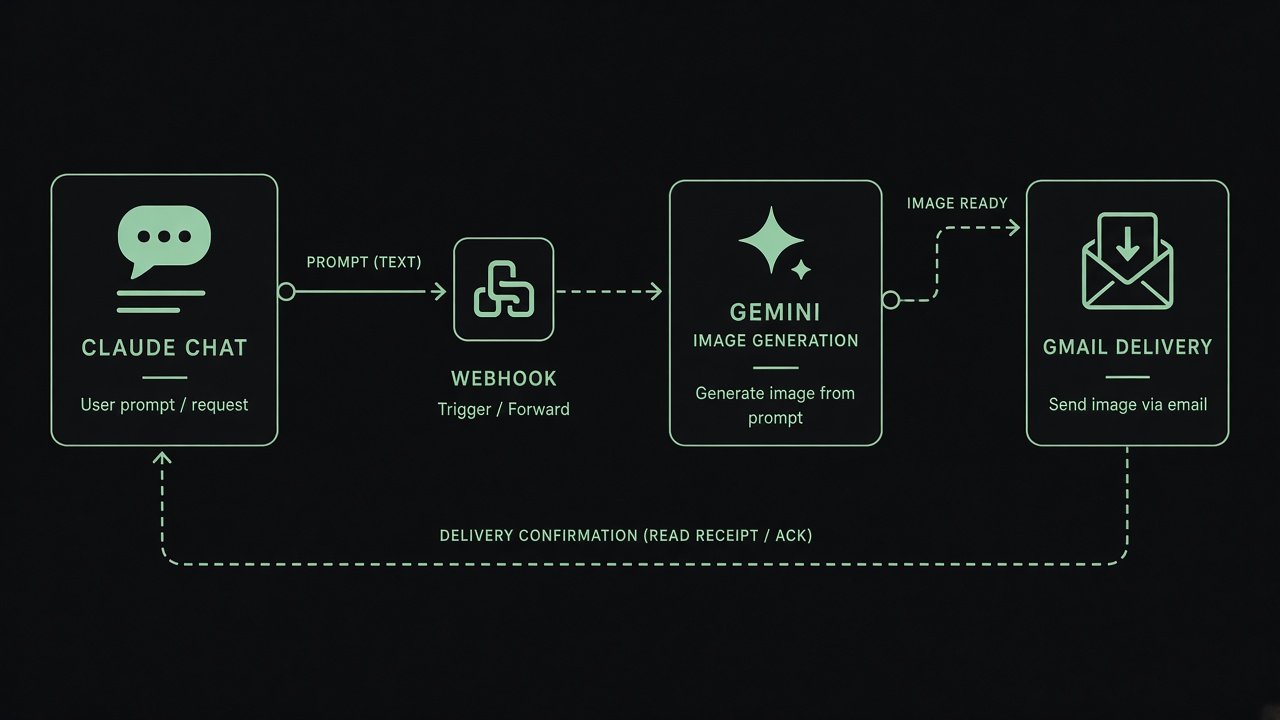
I do most of my writing and thinking with Claude, but when I need a visual I'd have to switch tools and retype the prompt. This workflow lets Claude hand the job off. Claude calls a webhook with a prompt, Gemini generates the image, and Gmail sends it to me with the prompt in the subject line. Claude gets a confirmation back in the same conversation once the image has actually gone out. A LinkedIn step for publishing straight from the chat is in testing.
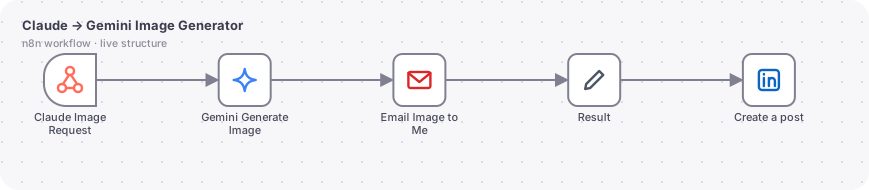
The actual n8n workflow
// Technical overview
A tiny but useful bridge. An AI chat can call one webhook with a prompt, n8n asks Gemini to draw it, and the picture arrives in my inbox while the caller receives a status JSON.
// Trigger
POST webhook at a dedicated path with a JSON body: prompt, and an optional email for the recipient. The response is the output of the last node.
// How it works, step by step
- 01
Webhook
Receives the prompt and optional recipient.
- 02
Gemini image generation
The Google Gemini node (image resource) uses the prompt as is and returns the picture as binary data.
- 03
Email with attachment
Gmail sends an HTML mail with the image attached. The subject is the first 60 characters of the prompt, and the body echoes the full prompt so every image stays traceable.
- 04
Result
A Set node returns status, prompt and recipient to the caller, which is how the chat confirms the image has really been sent.
// AI design
Gemini image model with no system prompt, so quality depends on the prompt the calling assistant writes. A LinkedIn posting step is being tested in the draft but is not part of the running version.
// What you can do with it
Visuals from a writing session
While drafting a post, ask for the hero image in the same chat and receive it by mail.
Batch creative options
Call the webhook several times with prompt variations to get a set of options to choose from.
Handoff to others
Pass a teammate's email and the image goes straight to them.
// Guardrails
- Every email carries the prompt, so there is an audit trail.
- A status response confirms delivery instead of assuming it.
// Where it can go next
- Add a shared secret header check before generating.
- Save images to Drive and return a link.
- Publish approved images to LinkedIn after a human review step.
Hiring a design leader for an AI product?
I'm open to design leadership roles. Send me a note and I'll reply within two working days.